Export-controlled items
Restrict quantities for international orders — Some products have export restrictions. Limit quantities or block checkout entirely for orders shipping to specific countries to comply with trade regulations.
Max qty · Country exclusion list

Industrial Component
Export-controlled
Qty: 10
$2,499.90
Limit exceeded
Max 2 units for international orders.
Why merchants need this
The challenge and how Nex MOQ solves it
Without order limits
Export regulations restrict certain products from being shipped in large quantities to specific countries. A single violation can result in massive fines and loss of export privileges.
With Nex MOQ
Use Nex MOQ AND conditions to combine Country with Product tag = "export-controlled" in a single rule. Use OR to group restricted countries — Country = X OR Country = Y — under one limit. Block checkout when a customer tries to ship more than the allowed amount to a restricted country.
How to set it up
No code required. Just create a rule and activate it.
Create a rule with type "Maximum quantity per product"
Set the export-allowed maximum (e.g., 2 units)
Add country conditions for restricted destinations
For fully blocked countries, set the maximum to 0
No credit card required · Works on all Shopify plans
Related use cases
Explore similar scenarios merchants are solving with Nex MOQ

Shipping to Canada
🇨🇦 5 items in cart
$124.95
Max 3 items for Canada. Remove 2.
Regional shipping limits
Comply with import regulations
Max 3 qty · Country = Canada

CBD Oil 500mg
Shipping to New York
$199.95
Max 2 CBD products per order in NY.
State-restricted products
Different limits per US state
Max qty varies · State = CA, NY, TX...
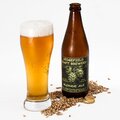
Craft Beer 6-Pack
Age-restricted
$59.96
Max 2 alcohol items per order in your state.
Age-restricted products
Limit 18+ product quantities by region
Max 2 per product · Country condition
Ready to enforce order limits?
Start your free trial. No code required. Works on all Shopify plans.
Plans from $9.99/month after free trial · Free for dev stores